
Volumes, pools & auto-labeling
Backup data is written to Volumes (disk files, cloud objects or tapes), grouped into Pools. NGBackup can manage the whole lifecycle for you — creating, labeling, recycling and pruning volumes automatically.
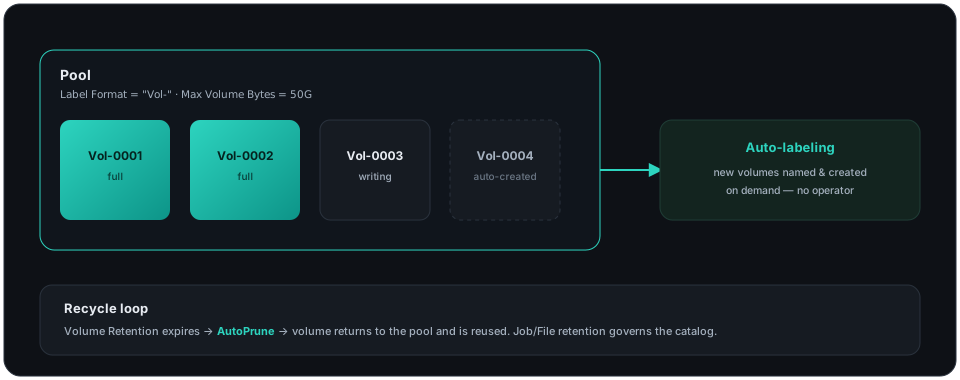
A Pool defines a set of volumes and the rules around them: how many, how big, how long to keep them, and when to reuse them. Common setups use separate pools for Full, Differential and Incremental backups. Every option is in the Pool resource reference.
Auto-labeling
Section titled “Auto-labeling”You never have to label volumes by hand. With automatic labeling, NGBackup creates and names a new volume on demand using a label format:
Pool { Name = "FilePool" Label Format = "Vol-" # auto-creates Vol-0001, Vol-0002, … Maximum Volume Bytes = 50G}On the Storage Device, Label Media = yes lets the daemon label blank media automatically. Storage is allocated, named and recycled with no operator action.
Recycling & retention
Section titled “Recycling & retention”Volumes are reused automatically once their data has expired, governed by three retention periods (set on the Pool/Client):
| Retention | Controls |
|---|---|
| Volume Retention | How long a volume’s data is kept before it can be recycled. |
| Job / File / Job Retention | How long job and file records stay in the catalog. |
| Recycle / AutoPrune | Whether expired volumes are pruned and reused automatically. |
With Recycle = yes and AutoPrune = yes, the system keeps itself tidy — old volumes are pruned and returned to the pool when needed.
Inspect & maintain
Section titled “Inspect & maintain”* list volumes* list pools* status storageLower-level tools: backup-ls (list a volume’s contents), backup-scan (rebuild the catalog from volumes), backup-copy (copy/migrate between pools). See the CLI tools and the Storage / Device references.
Tape & autochanger operations
Section titled “Tape & autochanger operations”Tape drives and autochangers are driven from the console with the same storage=NAME target you use for any Storage resource (sd=NAME is accepted as a synonym). The core verbs:
* mount storage=Tape1 # mount the device so jobs can write* unmount storage=Tape1 # free the drive for manual use (umount is accepted)* release storage=Tape1 # release the drive without unmounting the volume* automount storage=Tape1 on # auto-mount on demand (off to disable)For an autochanger, move a cartridge between magazine slots — for example to load a specific tape or to clear a drive — with transfer:
* transfer storage=Changer1 slot=3 dst=7 # slot-to-slot move; [drive=N] picks the driveLabel fresh media into a pool, and relabel reusable media (only volumes already Purged or Recycled):
* label volume=TAPE001 pool=Monthly* relabel oldvolume=TAPE001 volume=TAPE002 pool=MonthlyWhen you move a cartridge by hand, keep the catalog’s idea of its location in sync with update:
* update volume=TAPE001 slot=5 inchanger=yesEvery verb accepts output=json for scripting. Autochanger behavior — the Changer Command (the mtx-changer script), Changer Device, drive indexes and barcode handling — is configured on the Autochanger and Device resources; tape-drive health is reported via the Device Alert Command (TapeAlert).