
Jobs & scheduling
A job ties together what to back up (a Content — also accepted as FileSet, the Bacula-compatible name), which machine (a Client), where it goes (a Storage + Pool) and when (a Schedule). NGBackup runs several job types: Backup, Restore, Verify, Copy, Migrate and Admin.
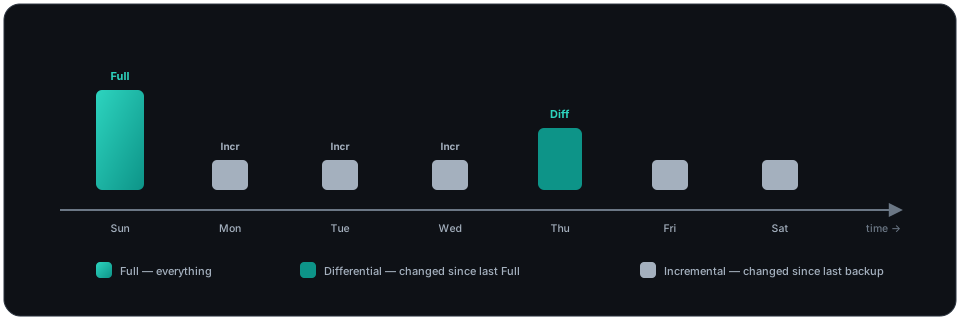
Backup levels
Section titled “Backup levels”| Level | What it copies |
|---|---|
| Full | Everything in the Content. |
| Differential | Everything changed since the last Full. |
| Incremental | Everything changed since the last backup of any level. |
A typical policy is a weekly Full + daily Incrementals; NGBackup automatically promotes an Incremental to Full when no prior Full exists.
Run a job
Section titled “Run a job”From the console:
/opt/backup/bin/backup-console* runPick a job from the numbered menu (type the number or the job name), review the defaults block, and answer the OK to run? (yes/mod/no) prompt:
yes— queue the job as shown.no(or.) — cancel.mod— open the parameter editor:
Parameters to modify: 1: Level 2: When 3: Priority 4: Storage 5: Pool 6: Client 7: FileSetSelect parameter to modify (1-7):Pick a field by number or by name (level, when, priority, storage, pool, client, fileset):
- Level shows a numbered menu (
1: Full / 2: Incremental / 3: Differential); answer with the number or the level word. The override is applied to the queued job. - When takes a
YYYY-MM-DD HH:MM:SStimestamp, or blank/nowto run immediately. The job stays queued until the timestamp passes. - Priority takes an integer from 1 to 100 (lower runs first).
- Storage, Pool, Client and FileSet each show a numbered menu of the configured resources of that kind; answer with the number or the resource name. The pick replaces the job’s configured resource for this run only — fields left untouched show
*Job default*on the defaults block and resolve from the Job resource at dispatch.
After each edit the defaults block is re-rendered and you return to yes/mod/no — successive mod rounds accumulate on the same run, so you can change Level and then Priority before confirming. To run non-interactively, the run command accepts the same overrides as keywords:
* run job="BackupClient1" level=Full yes* run job="BackupClient1" level=Differential priority=5 pool=Monthly yes* run job="BackupClient1" when="2026-06-15 22:00:00" storage=Tape1 yesAccepted keywords: job= (required), level= (Full / Incremental / Differential / Base / VirtualFull — or, for Type=Verify jobs, the verify levels listed below), priority= (1-100), when= (a quoted "YYYY-MM-DD HH:MM:SS" timestamp), storage=, pool=, client= and fileset= (configured resource names). An unknown resource name or an invalid value is refused with an error — nothing is queued. When a pool= or storage= override is applied, the job’s summary report marks the line (From command line) instead of (From Job resource).
Consolidating with VirtualFull
Section titled “Consolidating with VirtualFull”A level=VirtualFull run consolidates an existing chain — the most recent Full plus the Incrementals/Differentials taken since — into a brand-new Full backup, entirely on the server. No client is contacted: VirtualFull reads the catalog and copies the existing volume data, so it does not capture anything modified on the client since the last Incremental.
* run job="BackupClient1" level=VirtualFull yesThe consolidated Full is written to the destination Pool resolved from the Job’s Next Pool, or — if the Job has none — the source Pool’s Next Pool (see Next Pool). This lets a daily backup Pool feed its consolidations into a separate long-term Pool. The restore of a VirtualFull is byte-identical to restoring the original chain; newest-wins semantics apply, so a file changed across the consolidated Incrementals restores at its latest version.
Several Job directives shape consolidation: Max Full Consolidations, DeleteConsolidatedJobs, Max VirtualFull Interval and VirtualFull Backup Pool — see the Job reference for each.
Verify jobs
Section titled “Verify jobs”A Type = Verify job checks data instead of copying it. The level menus are job-type-aware: when the job you pick in run is a Verify job, the interactive mod → Level menu offers the Verify levels instead of the backup ones:
Levels: 1: InitCatalog 2: Catalog 3: VolumeToCatalog 4: DiskToCatalog 5: Data| Level | What it verifies |
|---|---|
| InitCatalog | Records a baseline of file attributes in the catalog for later Catalog runs. |
| Catalog | Compares the live filesystem against the InitCatalog baseline (file-integrity checking). |
| VolumeToCatalog | Reads the verified job’s records back from the volume and compares them with its catalog entries. |
| DiskToCatalog | Compares the live filesystem against the verified job’s catalog entries. |
| Data | Reads the job’s data from the volume and verifies its checksums. |
The same levels work non-interactively — level= on a Verify job accepts any of them:
* run job="VerifyVolume" level=VolumeToCatalog yes* run job="VerifyVolume" level=Data yesBackup jobs keep the backup level list (Full / Incremental / Differential) in both the menu and the level= keyword.
Watch it:
* status director* messagesLive job progress
Section titled “Live job progress”status client=NAME asks the File daemon directly. While a job is in flight, its Running Jobs: block carries live counters — files and bytes so far, average and last-interval rates, the bandwidth cap, read bytes, files examined vs backed up, and the file the walk is on right now — updated as the job progresses:
JobId 12 Job backup-node7.2026-06-10_23.05.01_03 is running. Incremental Backup Job started: 10-Jun-26 23:05 Files=1,204 Bytes=210,733,055 AveBytes/sec=4,338,021 LastBytes/sec=4,512,289 Errors=0 Bwlimit=0 ReadBytes=210,733,055 Files: Examined=1,842 Backed up=1,204 Processing file: /var/lib/app/data.dbRestore jobs show the same block with a Restore Job started: header. The block is stock-shaped, so existing monitoring tools that poll status client= keep working.
The Director also records a per-job throughput series while the job runs: a (time, bytes, files) sample roughly every 10 seconds (sooner when the byte counter jumps), plus a final sample at completion so the curve ends at the job’s real total. Pull it with the dot command:
* .jobprogress jobid=12* .jobprogress jobid=12 output=jsonThe text form emits tab-separated rows ordered by sample time (the shape GUI consoles parse); output=json returns the standard JSON envelope. Samples are pruned together with the job — delete jobid=N and retention pruning remove them.
The Web Console’s live job monitor draws the throughput curve from the FD’s cumulative read counter, not the catalog JobBytes. That matters for plugin and deduplicated jobs (e.g. a vSphere VM), whose JobBytes only commits at the end — reading it live would show a flat line and a stuck “0 B” in the running-jobs list even while the disk streams at hundreds of MB/s. Driving the curve and the dashboard’s running-jobs bytes from ReadBytes shows the real rate throughout the run.
Reading the job log
Section titled “Reading the job log”Every job keeps a full log in the catalog. Pull it with:
* list joblog jobid=4The first lines trace the job’s connections — Start Backup JobId 4, Job=…, Connected to Storage "File1" at sd1:9103, Using Device "FileDev1" to write., Connected to Client "node7-fd" at node7:9102 — followed at termination by the standard summary block:
backup-dir 1.0.0-beta.1 (backup-dir): Build OS: linux x86_64 Oracle Linux Server 9.7 JobId: 4 Job: backup-node7.2026-06-10_23.05.01_03 Backup Level: Incremental, since=2026-06-09 23:05:02 Client: "node7-fd" node7.example.com linux x86_64 Oracle Linux Server 9.7 Content: "node7-fileset" Pool: "Default" (From Job resource) Catalog: "MyCatalog" Storage: "File1" (From Job resource) Scheduled time: 10-Jun-2026 23:05:01 Start time: 10-Jun-2026 23:05:01 End time: 10-Jun-2026 23:06:13 Elapsed time: 1 min 12 secs Priority: 10 FD Files Written: 1,842 SD Files Written: 1,842 FD Bytes Written: 312,406,118 (297.9 MB) SD Bytes Written: 312,581,330 (298.0 MB) Rate: 4238.1 KB/s Software Compression: None Comm Line Compression: None Global Dedup: None Snapshot/VSS: no Encryption: no Accurate: no Volume name(s): Default-0007 Volume Session Id: 12 Volume Session Time: 12 Last Volume Bytes: 312,602,994 (298.1 MB) Non-fatal FD errors: 0 SD Errors: 0 FD termination status: OK SD termination status: OK Termination: Backup OKThe block is stock-shaped — same layout, alignment, comma-grouped byte counts with human suffixes, and termination words (Backup OK, Backup OK -- with warnings, *** Backup Error ***, Backup Canceled) as the report stock Bacula’s Director writes at job termination — with one label difference: the FileSet: row is spelled Content: (the resource’s preferred name here). Log parsers, scrapers and monitoring checks built for Bacula keep working as long as they match either spelling of that row; everything else is unchanged. Compare FD Bytes Written vs SD Bytes Written to spot transport overhead, and check the two termination statuses plus the error counters before trusting Termination.
Schedule it
Section titled “Schedule it”Jobs run automatically via a Schedule resource:
Schedule { Name = "WeeklyCycle" Run = Full sun at 23:05 Run = Incremental mon-sat at 23:05}Every scheduling directive is in the Schedule resource reference. Job behaviour (priority, concurrency, retention, retries…) is controlled by the Job resource directives.
Concurrency & priority
Section titled “Concurrency & priority”Run more jobs at once by raising Maximum Concurrent Jobs on the Director, Client and Storage, and order them with Priority. See the Job and Director references.