Architecture & components
NGBackup is a modern, Rust-native data-protection platform: an all-new codebase written 100% in Rust with zero lines of C, memory-safe by construction, with significantly improved performance and far more features than legacy backup tools. It ships under its own brand-neutral backup-* programs, a single remote control plane, database-backed configuration, token-based enrollment (no clear-text passwords on disk), active/standby high availability, and a friendlier toolset.
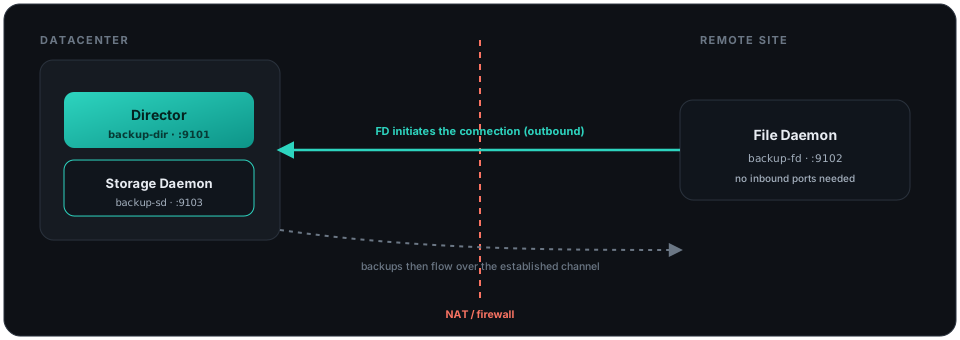
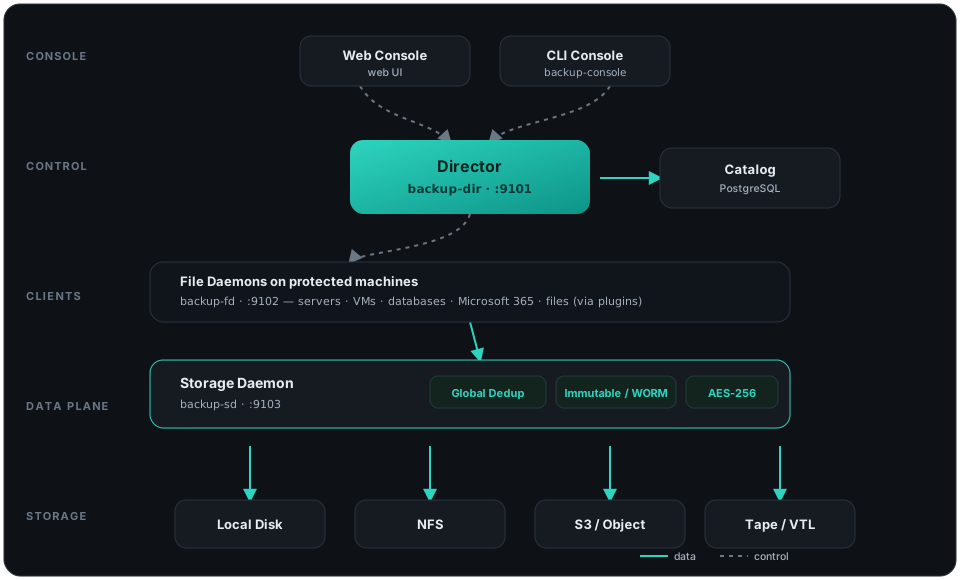
A working installation is made of a few small services that talk to each other over the network. You don’t have to run them on the same machine — that separation is exactly what lets NGBackup scale from one server to thousands.
The pieces at a glance
Section titled “The pieces at a glance”| Component | Program | Default port | What it does |
|---|---|---|---|
| Director | backup-dir | 9101 | The brain. Schedules jobs, applies policies, and coordinates the other services. |
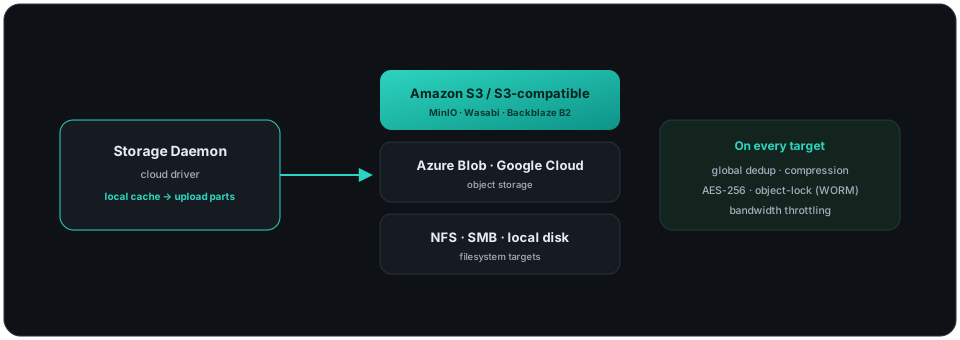
| Storage Daemon | backup-sd | 9103 | Reads and writes backup data to disk, S3/object, NFS or tape — with global deduplication, immutability and encryption. |
| File Daemon | backup-fd | 9102 | The lightweight agent on each protected machine; streams its data to the Storage Daemon. |
| Catalog | PostgreSQL | — | The database that records every file, job and volume, so restores are fast. |
| Console | backup-console | — | The command-line interface to run and watch jobs. |
| Web console | Web Console | — | The dark-mode web UI: dashboards, policy designer, restore explorer and a Ctrl+K command palette. |
One job, three services. A backup flows like this: the Director starts the job → the File Daemon reads the data → the Storage Daemon deduplicates, encrypts and writes it → the Catalog records what happened. Restores run the same path in reverse.
Where things live
Section titled “Where things live”Everything installs under /opt/backup/ by default:
| Path | Contents |
|---|---|
/opt/backup/bin/ | All programs (backup-dir, backup-sd, backup-fd, backup-console, …) |
/opt/backup/etc/ | Configuration files (backup-dir.conf, backup-sd.conf, backup-fd.conf, backup-console.conf) |
/opt/backup/plugins/ | File Daemon plugins (override with --plugin-dir) |
The File Daemon can also run without a config file — fully flag-driven, ideal for automated and container deployments:
backup-fd --fd-address 127.0.0.1 --fd-port 9102 \ --sd-address 127.0.0.1 --sd-port 9103Operator toolkit
Section titled “Operator toolkit”| Program | Use it to… | Bacula equivalent |
|---|---|---|
backup-cli | drive the Director from scripts | — |
backup-copy | copy/migrate volumes between pools | bcopy |
backup-extract | extract files straight from a volume | bextract |
backup-ls | list the contents of a volume | bls |
backup-scan | rebuild the catalog from volumes | bscan |
backup-dbcheck | check and repair the catalog | dbcheck |
backup-dirjson · backup-sdjson · backup-fdjson · backup-consjson | dump any config as JSON | — |
How plugins fit in
Section titled “How plugins fit in”Workload-specific protection (databases, hypervisors, Microsoft 365, …) is delivered by File Daemon plugins in /opt/backup/plugins/. Enable one in a Content, passing options as key=value pairs:
Content { Name = "proxmox-cluster" Include { Options { Plugin = "proxmox: pve_host=10.0.0.10 vm=* backup_type=full" } }}Each plugin documents its own backup and restore parameters — including Instant Recovery and cross-hypervisor restore (V2V). See Plugins.
Moving from Bacula? NGBackup ships a migration tool that imports an existing Bacula catalog, volumes and configuration, so you can migrate at your own pace, mixed deployments included. See Migrating from Bacula.