
Restore, Instant Recovery & V2V
NGBackup restores range from a single file to a whole VM booted in seconds — and even into a different hypervisor.
Restore files (console)
Section titled “Restore files (console)”/opt/backup/bin/backup-console* restoreChoose a selection method:
To select the JobIds, you have the following choices: 1: List last 20 Jobs run 2: Enter list of comma separated JobIds to select 3: Enter a filename to list the Jobs that saved it 12: CancelMethod 3 searches the catalog by filename (basename): enter e.g. passwd and NGBackup lists every job that backed it up — if only one job holds the file it drops you straight into that job’s tree, otherwise pick the job from the numbered list. After any method, browse and mark what you want:
cd /etcmark passwdmark hostsdoneConfirm the restore job. By default files land in /tmp/bacula-restores so you never overwrite originals — change the destination (where=) in the dialog when you’re ready. Full directive control is in the Job resource (Where, Replace, Restore Client, …).
Restore by JobId
Section titled “Restore by JobId”restore jobid=N restores exactly the files that job N wrote — stock semantics. Restoring an Incremental brings back only the files that job captured, not the whole chain it belongs to:
* restore jobid=42 where=/tmp/bacula-restores yesAdd chain=1 to opt into full-chain replay: the Director resolves the chain that ends at job N — the most recent Full plus every intermediate job — and restores each job in order. This is the right shape for plugin delta streams that re-apply changes onto an existing target (an already-provisioned VM, a previously extracted file):
* restore jobid=42 chain=1 where=/restore yesThe interactive restore dialog is independent of both forms: the tree you browse is the merged point-in-time view of the selected jobs, and the restore writes exactly the files you mark — nothing more.
Granular restore
Section titled “Granular restore”Descend into a backed-up VM’s guest filesystem (ext2/3/4, NTFS) and pull individual files or folders — no full-disk rehydration. Incremental chains are folded over the Full automatically.
The engine runs embedded in the Storage Daemon — there is no separate daemon or config file. The Director resolves the job’s volume chain from its own catalog and proxies the session verbs to the owning Storage Daemon:
* .gr_open jobid=42 # open a session over job 42's chain* .gr_ls session=S path=/etc # list a guest directory* .gr_stat session=S path=/etc/hostname* .gr_get session=S path=/etc/hostname # inline read (small files)* .gr_close session=S* .gr_sessions # active sessions on the SD.gr_open reports a state alongside the session id. For a normal-sized backup the chain is indexed inline and the reply comes back ready with the disk list:
{"session":"1bffafdc4af1","state":"ready", "disks":[{"index":0,"label":"FileIndex 4","capacity":2147483648,"fs":"ext4"}]}Opening a session indexes the backup. .gr_open walks the volume chain and returns when the session is ready to browse — its stored state is ready on success or failed if indexing errors. .gr_sessions shows each session’s state.
* .gr_open jobid=42 → {"session":"S","state":"ready","disks":[…]} # ready to browseA browse verb (.gr_ls, .gr_stat, .gr_get) against a failed session returns a stage:"open" error.
Two configuration knobs govern access and capacity — both changeable from the console with no daemon restart:
- Per-job policy:
Granular Restoreon the Job (config set job=<Name> GranularRestore=norefuses.gr_openfor that job’s backups). - Storage-side capacity and kill-switch: the
Granular/Gr*directives on the Storage Daemon (config set sd=<Storage> storage=<Name> GrMaxSessions=4hot-applies).
Instant Recovery
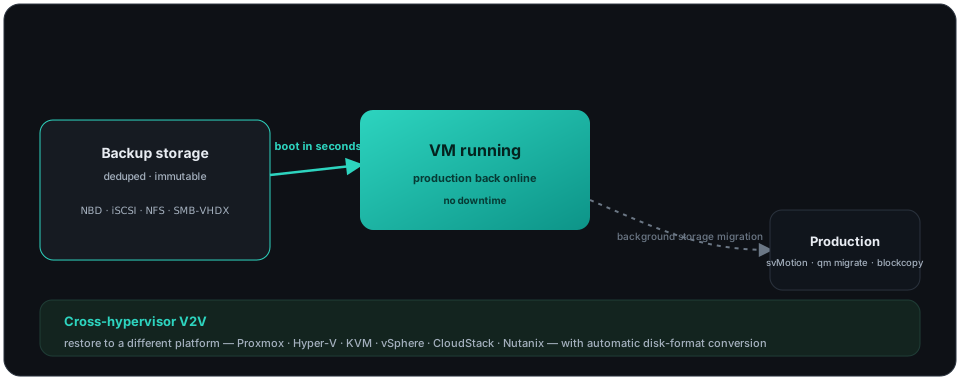
Section titled “Instant Recovery”Boot a backed-up VM directly from backup storage over NBD, iSCSI, NFS-Datastore or SMB-VHDX — production is back in seconds while the disk migrates to permanent storage in the background (svMotion / qm migrate / virsh blockcopy), with zero downtime.
Cross-hypervisor V2V
Section titled “Cross-hypervisor V2V”Restore a VM into a hypervisor different from the one it was backed up on — Proxmox, Hyper-V, KVM, vSphere, CloudStack, Nutanix — with automatic disk-format conversion (qcow2 / raw / vmdk / VHDX) and native VM-config generation. See the per-hypervisor plugin pages for the exact restore parameters.
Bootstrap files
Section titled “Bootstrap files”For scripted or disaster-recovery restores, NGBackup can drive the Storage Daemon from a bootstrap file that pinpoints the exact volumes and records to read — the fastest possible recovery path.